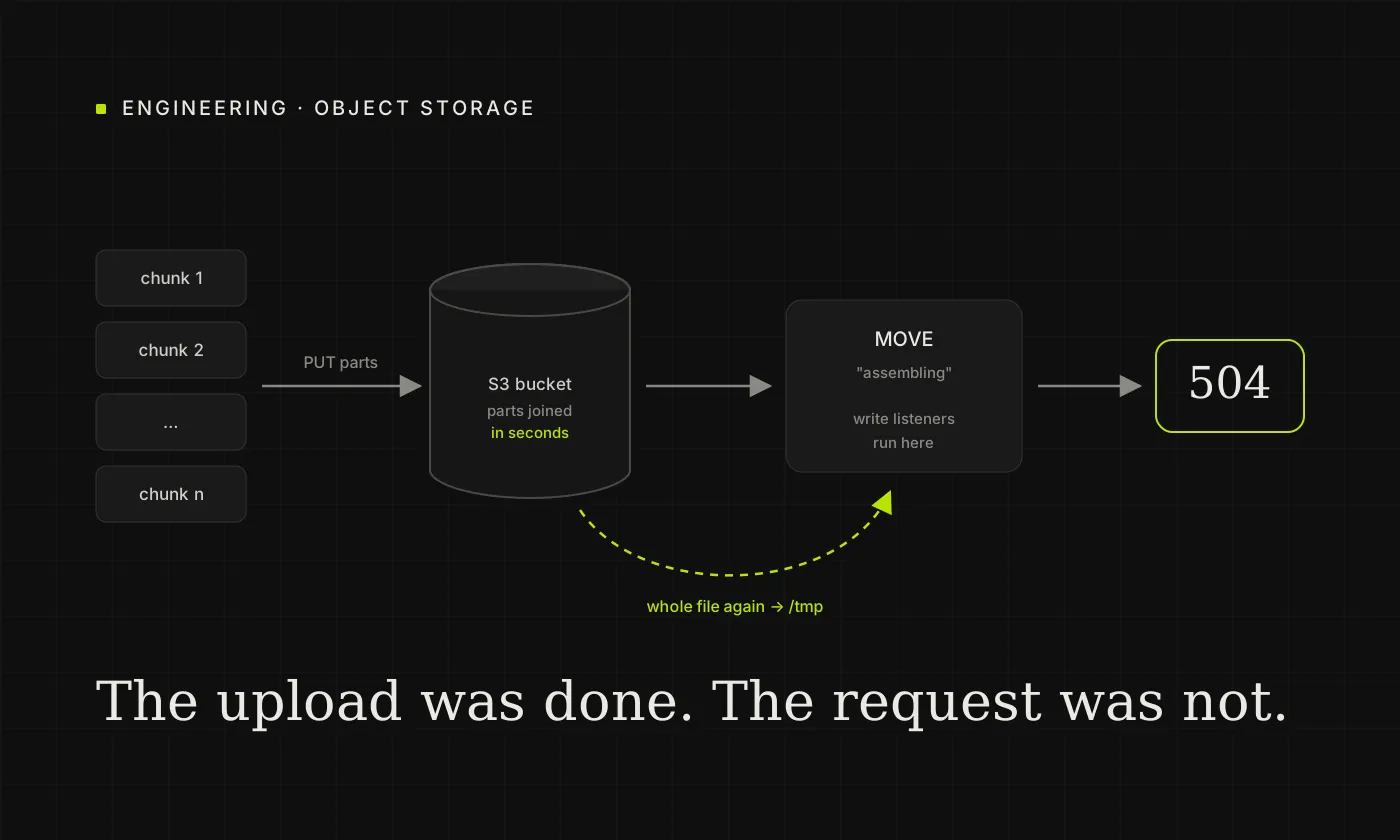
A 3 GB video upload to Nextcloud finished in about two minutes. Then the progress bar sat on "assembling" for several more, and the web UI reported Error during upload, status code 504. The file was there afterwards, complete and correct. Nothing was lost, but every large upload looked like a failure.
The instance stores its files on S3-compatible object storage, behind Caddy as the reverse proxy. This article walks through what "assembling" actually does on object storage, how we found the real cause, and the fix. The cause turned out not to be the upload at all.
The symptom
- Small files upload normally.
- Large videos, from roughly a few hundred megabytes up, finish uploading and then stay on "assembling" for minutes.
- The proxy gives up waiting and answers 504. The browser shows an error for an upload that actually succeeded.
- Photos are not affected in the same way, even when there are many of them.
What "assembling" does on object storage
The web UI uploads large files with chunked upload v2:
- It creates an upload session under
remote.php/dav/uploads/<user>/<id>and tells the server the final destination. - It sends the file in chunks, one
PUTper chunk. - It finishes with a
MOVEof the session onto the destination path. That request is the "assembling" step in the UI.
On local disk, the MOVE really does stitch the chunks together into one file. On S3 primary storage it does not have to. Nextcloud maps the session to an S3 multipart upload: every chunk is uploaded straight away as a part, and the MOVE only sends CompleteMultipartUpload. The object store joins the parts itself, usually within seconds, even for several gigabytes.
So if "assembling" takes minutes on object storage, the time is not being spent on joining the chunks. Something else runs inside that MOVE request.
Finding the real cause
The MOVE request does more than complete the upload. Once the file exists, Nextcloud records it in the file cache and fires its write events. Every app that listens to those events runs inside the same request, and the client waits for all of them.
The quickest way to see what they are doing is to watch the app container while a large file is "assembling":
watch -n 2 'docker exec nextcloud-app du -sh /tmp'
During a 3 GB upload, /tmp grew from 117 MB to 2.2 GB and dropped back to 39 MB once the request ended. Something was downloading the whole file from the bucket into local temporary storage, right after it had been uploaded there.
Why the file is downloaded again
The culprit was the Memories photo and video app. Memories indexes every new photo and video as soon as it is written: it reads the metadata (date, location, dimensions, duration) so the file appears in the timeline straight away. Its write listener calls the indexer synchronously.
The indexer runs exiftool (and ffprobe for videos), which need a local file. On local storage that is just the file itself. On object storage, Nextcloud has to download the entire object to /tmp first. For a photo of a few megabytes nobody notices. For a 3 GB video that is a 3 GB download, inside the upload request, before the response can be sent.
Any app that reads the whole file in a write listener would cause the same thing. On object storage it is simply far more expensive than on local disk.
The fix: index large files in the background
Memories already has a background job that indexes every file missing from its index. It runs with cron, every 15 minutes. Large files can wait for it. The only change needed is to stop the write listener from indexing large files during web requests.
We added a guard at the top of the listener's indexing branch, in lib/Listeners/PostWriteListener.php:
// Indexing reads the whole file; on object storage that means a full download
// inside the upload request. Large files are left to the background indexer.
if (!\OC::$CLI && $node instanceof File
    && $node->getSize() > \OCP\Server::get(\OCP\IConfig::class)
        ->getSystemValueInt("memories_defer_index_above", 268435456)) {
    return;
}
- Files above the limit (256 MiB by default) are skipped during web and WebDAV requests. The background job indexes them a few minutes later.
- Photos and small videos are still indexed immediately.
occcommands are not affected, soocc memories:indexbehaves as before.- The limit is a normal system setting:
occ config:system:set memories_defer_index_above --value=536870912 --type=integer
Because this changes an app's code, an app update replaces the file. With the official Docker image, the change can live in a before-starting hook (/docker-entrypoint-hooks.d/before-starting/), which applies it again on every container start. Our hook checks whether the guard is already there, checks the PHP syntax before writing, and does nothing if a new Memories release has changed that part of the code.
The result:
- "Assembling" a 3 GB video takes a few seconds.
/tmpstays at a few kilobytes during the upload.- No more 504s.
- The video appears in Memories after the next background run instead of immediately, which is a reasonable trade for large files.
What did not help
Raising the proxy and PHP timeouts would have hidden the 504, but not the cost. Every large upload would still download the whole file again, tie up a PHP worker for minutes, and fill /tmp with as many gigabytes as uploads running at the same time. The real fix is to move the work out of the request, not to wait longer for it.
If you see the same thing
- Check whether your primary storage is object storage. On local disk, a slow "assembling" step can have other causes.
- Watch
/tmp(or your configured temporary directory) inside the app container while a large file is assembling. If it grows to the size of the file, something is reading the file inside the request. - List the apps that react to new files: photo and video apps, full-text search, antivirus, workflow rules. Disable them one at a time on a test upload to find the one that reads the file.
- Move that work to a background job, or make it skip large files during web requests.
We have reported the behaviour to the Memories project, with the guard above as a suggestion.